Blu-ray vs 4K UHD: Key Differences, Pros and Cons [2026 Updated]

Summary: Blu-ray vs 4K depends on your TV, player, budget, and viewing needs. 4K UHD Blu-ray gives higher resolution, HDR, wider color, and larger disc capacity, while standard Blu-ray still offers strong 1080p quality, lower cost, and wider compatibility. Choose 4K UHD for a home theater setup and Blu-ray for value.
Many movie lovers may wonder: is 4K Ultra HD always better than Blu-ray? When I got a new TV, I asked myself the same thing and spent weekends comparing my favorite movies in different formats.
I learned that Blu-ray has been the HD standard for a long time since it has superb picture quality and is widely available. However, 4K UHD has higher resolution, HDR, and immersive audio, but it also needs the right equipment and is often more expensive.
In this guide, I'll talk about the real differences in quality, HDR, sound, and price. I'll also explain when Blu-ray is still useful and provide you useful tips on how to choose the best format for your system.
What are Blu-ray and 4K UHD?
What is Blu-ray?
Blu-ray Disc is a high-definition optical disc format that replaced DVD as the mainstream physical format for HD movies and games. It uses a blue-violet laser to read and write data at a higher density than DVD, which allows more video, audio, and bonus content to fit on the disc.
A single-layer Blu-ray can hold about 25 GB, and a dual-layer disc can hold about 50 GB. That capacity is enough for 720p or 1080p HD video with lossless audio tracks, subtitles, and extras. Blu-ray became popular because it delivered much better quality than DVD and built a large movie catalog after winning the HD DVD vs Blu-ray format war.
What is 4K UHD (Ultra HD Blu-ray)?
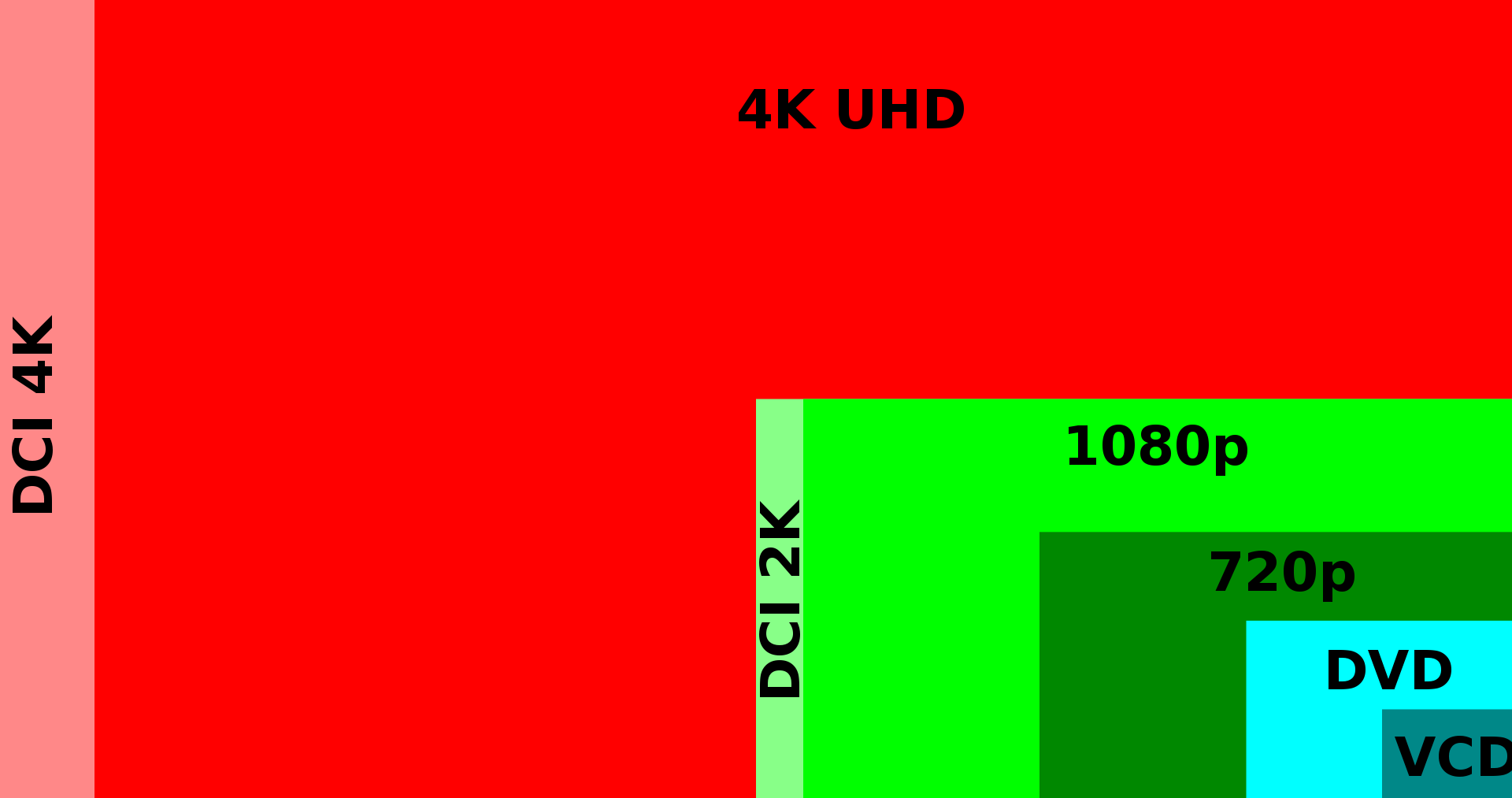
4K UHD usually refers to Ultra HD Blu-ray, the physical disc format for 4K Ultra High Definition home video. It supports 3840 × 2160 video, which has four times the pixel count of 1080p Blu-ray. In professional cinema, DCI 4K uses 4096 × 2160, but UHD is the standard used by most TVs and home players.
The upgrade is not only resolution. Ultra HD Blu-ray supports HEVC video compression, HDR10 as a standard HDR format, optional Dolby Vision or HDR10+ on some releases, 10-bit video, and a wider BT.2020 color container. Many releases also include lossless audio and immersive formats such as Dolby Atmos or DTS:X, depending on the title.
Blu-ray vs 4K UHD: Key Differences & Comparison
Standard Blu-ray and 4K UHD Blu-ray are both physical disc formats, but they are built for different home-theater setups. Blu-ray focuses on reliable 1080p HD playback and broad compatibility, while 4K UHD Blu-ray is designed for 4K HDR displays, higher-capacity discs, and premium audio/video transfers.
| Feature | Standard Blu-ray | 4K UHD Blu-ray |
|---|---|---|
| Resolution | 1920 × 1080 | 3840 × 2160 |
| HDR | Usually SDR | HDR10 is standard; Dolby Vision and HDR10+ may appear on selected releases |
| Color | Rec.709, usually 8-bit | BT.2020 container, 10-bit video |
| Video Codec | H.264/AVC, VC-1, or MPEG-2 | HEVC/H.265 |
| Storage Capacity | 25 GB single-layer, 50 GB dual-layer | 50 GB, 66 GB, or 100 GB |
| Player Compatibility | Standard Blu-ray player, 4K UHD Blu-ray player, compatible game consoles | Requires a 4K UHD Blu-ray player or compatible console |
| Audio | Lossless formats such as Dolby TrueHD and DTS-HD Master Audio may be available | Lossless formats may be available, often with Dolby Atmos or DTS:X on selected releases |
| Best For | 1080p TVs, smaller screens, lower disc cost, broad title availability | 4K HDR TVs, larger screens, collectors, premium transfers, home theaters |
Resolution & Video Specs
Standard Blu-ray delivers 1080p HD video, which still looks clean on many TVs, especially smaller screens or setups where the viewer sits farther away. 4K UHD Blu-ray increases the resolution to 3840 × 2160 and uses HEVC video compression, giving the disc more room for fine detail when the source master and display can show it clearly.
The sharpness difference is easiest to see on a larger 4K TV, a projector, or a close viewing setup. On a smaller 1080p screen, standard Blu-ray can still look excellent because the display cannot show the full resolution advantage of a UHD disc.
HDR, Color, and Contrast
4K UHD Blu-ray has a stronger advantage in HDR and color than in resolution alone. HDR can preserve brighter highlights, deeper shadows, and a wider contrast range when the TV supports it. A good UHD disc can also use wider color information, which helps landscapes, skin tones, animation, and high-contrast scenes look more natural.
Standard Blu-ray usually uses SDR video. It can still look sharp and film-like, but it cannot show the same HDR highlights or wide-color presentation that a well-mastered 4K UHD disc can provide.
Audio Quality
Both Blu-ray and 4K UHD Blu-ray can include lossless audio, so the format alone does not guarantee better sound. The real difference depends on the specific release and your audio setup. Many 4K UHD releases include Dolby Atmos or DTS:X, which can add overhead or object-based effects when the receiver, speakers, and playback device support them.
For users with only TV speakers or a basic soundbar, the audio gap may be smaller. For users with a full home theater system, the best UHD releases can make action scenes, concerts, and large-scale soundtracks feel more immersive.
Compatibility & Storage
Compatibility is one of the biggest practical differences between Blu-ray and 4K UHD Blu-ray. A standard Blu-ray disc can play on a normal Blu-ray player, a UHD Blu-ray player, and many compatible game consoles. A 4K UHD Blu-ray disc needs a UHD Blu-ray player or a compatible console, so it will not work in a standard Blu-ray player.
Storage also affects quality. Standard Blu-ray discs usually use 25 GB or 50 GB, while 4K UHD Blu-ray discs can use 50 GB, 66 GB, or 100 GB. The larger disc capacity gives UHD releases more room for 4K video, HDR data, higher bitrates, audio tracks, subtitles, and bonus content.
Content & Availability
Streaming platforms win on convenience because you can start a movie without handling a disc. However, their catalogs rotate, and not every title stays available in the same quality or edition. Some titles also lose bonus content, commentary, or extras when they move across platforms.
Blu-ray and 4K UHD discs are stronger for collectors. Once you buy the disc, the movie is part of your collection and the quality does not depend on internet speed, service compression, or licensing changes. Disc editions also often include deleted scenes, commentaries, booklets, posters, or collector packaging.
Native 4K vs Upscaled 4K UHD Discs
Not every 4K UHD Blu-ray has the same visual upgrade. Some discs come from native 4K masters, while others are mastered from a 2K digital intermediate and then finished for UHD release. A native 4K transfer usually has the clearest detail advantage, especially in textures, fine background elements, and wide shots.
An upscaled UHD disc can still look better than the standard Blu-ray because it may include HDR, wider color, and a higher bitrate. But the sharpness jump may be smaller. Before upgrading a favorite title, check the transfer notes, reviews, or disc community comments if native 4K detail matters to you.
Blu-ray or 4K UHD: Cost & Use Cases
Price & Cost Considerations
There are three primary cost factors: disc prices, playback equipment, and ongoing subscriptions if streaming is part of your setup.
- Disc prices: In the U.S. market, a Blu-ray often costs less than a 4K UHD disc. Collector's editions, steelbooks, and limited releases can raise the price for either format.
- Players and setup: A standard Blu-ray player is usually cheaper and easier to find. A UHD player, HDR-capable 4K TV, and compatible receiver or soundbar can increase the total cost of a 4K setup.
- Streaming as a reference: Services such as Netflix or Disney+ are convenient and cheaper upfront, but they depend on internet speed, subscription access, and compressed video or audio delivery.
Blu-ray still gives strong value if you want permanent ownership, reliable 1080p quality, and a large catalog at lower prices. 4K UHD costs more, but it can deliver the best home-disc quality when your display, player, and audio system can use the format's advantages.
Use Cases & Buying Guide
Choose Blu-ray if:
- You want reliable 1080p HD for most movies and TV shows.
- You prefer cheaper discs and cheaper players.
- You use a 1080p TV, a smaller screen, or an older Blu-ray player.
- You care more about title availability than HDR or 4K resolution.
Choose 4K UHD Blu-ray if:
- You have a 4K HDR TV and want to use its full picture capability.
- You care about HDR highlights, wider color, and the sharpest disc-based image.
- You have a compatible UHD Blu-ray player or game console.
- You collect premium transfers, blockbuster movies, or long-term archive editions.
💡 Many 4K UHD packages include a standard Blu-ray disc or a digital code, which can help if you use more than one playback setup.
Recommended: Best Blu-ray & UHD Ripper Software
After comparing Blu-ray and 4K UHD, many users may also want a safer way to preserve discs they already own or watch movies without using the physical disc every time. Blu-ray and UHD ripping software can help create personal digital backups. For this workflow, I recommend DVDFab because it supports Blu-ray and UHD disc conversion with flexible output formats and regular disc support updates.

Legal note: The following tools are intended for legitimate personal use, such as backing up discs you own. Please follow your local copyright laws and do not distribute copied files.
DVDFab Blu-ray Ripper
DVDFab Blu-ray Ripper can convert Blu-ray discs, ISO files, or folders to MKV, MP4, and other video or audio formats for personal backup and playback on TVs, tablets, or home theater devices.
Supported OS:
- Works with any Blu-ray protection to enable access to your discs; support is updated regularly
- Convert Blu-ray discs, ISO files, or folder to popular video and audio formats
- Leverage advanced GPU acceleration technology and multitasking capabilities
- Optimized output for 245+ device profiles (e.g., iPhone, iPad, Huawei, Smart TVs)
- Built-in video editor lets you trim, crop, rotate, add subtitles, or watermarks
How does DVDFab Blu-ray Ripper work?
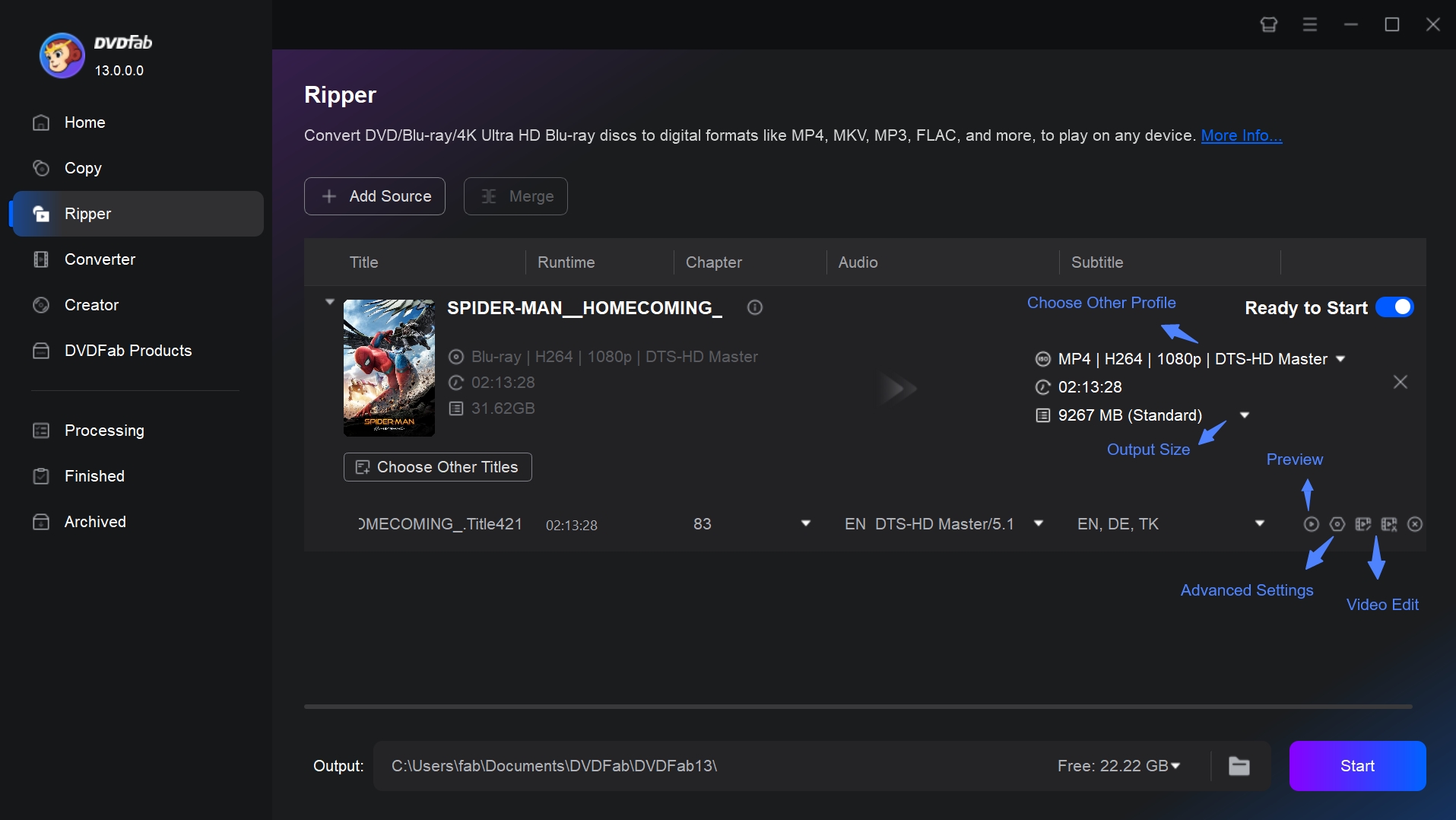
Step 1: Launch DVDFab and open the Ripper module. Insert the Blu-ray disc, or click the Add button to import an ISO file or folder that is already saved on your computer.
Step 2: Click Choose Other Profile to select the output format and codec. You can choose specific titles, audio tracks, and subtitles. Use Advanced Settings and the built-in Video Editor if the output needs more adjustment.
Step 3: Choose a save location on your hard drive or device. Click the Start button, and DVDFab Blu-ray Ripper will begin converting the Blu-ray source.
DVDFab UHD Ripper
DVDFab UHD Ripper is designed for users who want to convert 4K UHD Blu-ray discs, ISO files, or folders to common video formats for personal backup and playback. It can preserve HDR10 or Dolby Vision effects when the selected output profile and playback device support them.
- Handle 4k Blu-ray copy protection to enable conversion.
- Convert UHD Blu-ray discs, ISO files, or folders to MP4, MKV, and other formats.
- Keep HDR10 or Dolby Vision effects when the output profile supports them.
- Adjust video, audio, and subtitle settings before conversion.
- Compress large UHD sources for playback on mobile devices or media servers.
- Use task queue and hardware acceleration when supported by the system.
FAQs
Is 4K UHD always better than Blu-ray?
Not always. 4K UHD Blu-ray usually has higher resolution, HDR, wider color, and more storage, but the visible upgrade depends on your TV, player, viewing distance, screen size, and the source master. On a 1080p TV or a small screen, standard Blu-ray can still look excellent.
Do I need a special player for 4K UHD Blu-ray?
Yes. A 4K UHD Blu-ray disc needs a UHD Blu-ray player or a compatible console. A standard Blu-ray player can play regular Blu-ray discs, but it cannot play 4K UHD Blu-ray discs.
Are 4K UHD Blu-ray discs region-free?
Most 4K UHD Blu-ray discs do not use the same official region coding system as standard Blu-ray, but a few releases may still have playback restrictions. If you import discs from another country, check the title-specific notes before buying.
Is every 4K UHD Blu-ray a native 4K transfer?
No. Some 4K UHD Blu-ray discs come from native 4K masters, while others are finished from 2K digital intermediates and then upscaled. A non-native UHD disc can still benefit from HDR, wider color, and higher bitrate, but the sharpness gain may be smaller.
How does 4K streaming compare to 4K UHD discs?
4K streaming is convenient, but it should not be treated as the same thing as 4K UHD Blu-ray. Streaming quality depends on internet speed, service compression, device support, and the platform's bitrate. It is easy to start watching, but the picture and audio can vary by connection and title.
4K UHD Blu-ray is less convenient because it needs a disc and a compatible player, but the quality is more consistent. The disc does not depend on bandwidth, and premium releases can carry higher-bitrate video and lossless or immersive audio. For casual viewing, streaming is often enough. For a home theater setup or a favorite movie collection, UHD Blu-ray is still the stronger physical-media option.
Will there be 8K Blu-ray discs?
There is no mainstream consumer 8K Blu-ray disc format in use today. 8K video requires much more data than current home video discs are designed to carry, so 4K Ultra HD Blu-ray remains the practical physical-media standard for home theater users.
Which is better, Blu-ray or DVD?
Blu-ray is better for picture and sound quality. DVD is limited to standard definition, while Blu-ray supports HD video up to 1080p and can include lossless audio formats. For a detailed comparison, see Blu-ray vs DVD.
Conclusion
Blu-ray vs 4K is not a one-size-fits-all choice. Standard Blu-ray is still a strong format for 1080p TVs, smaller screens, lower disc prices, and broad title availability. 4K UHD Blu-ray is the better choice when you have a 4K HDR setup, a compatible player, and a favorite movie that benefits from HDR, wider color, higher bitrate, and premium audio. For casual watching, streaming may be enough, but for consistent disc quality and long-term ownership, Blu-ray and 4K UHD remain the stronger physical-media options.
If you want to preserve your Blu-ray or UHD Blu-ray discs for personal playback, DVDFab Blu-ray Ripper and DVDFab UHD Ripper can help convert your disc collection into digital files while keeping the format, subtitle, and audio choices under your control.

![Top 5 Free Blu-ray Decrypters for Legal Use [2026 Test]](https://r1.dvdfab.cn/upload/resource/how-to-decrypt-blu-ray-Row0.jpeg) Top 5 Free Blu-ray Decrypters for Legal Use [2026 Test]By Wenny Yan - Jun 26, 2026
Top 5 Free Blu-ray Decrypters for Legal Use [2026 Test]By Wenny Yan - Jun 26, 2026 Best Free Blu-ray Rippers in 2026: Tested Tools and Guide to Rip Blu-raysBy Wenny Yan - Jun 12, 2026
 How to Convert 3D Blu-ray to 2D Video: DVDFab 3D Converter GuideBy Diana Smith - Jun 10, 2026
 How to Rip Blu-ray to MKV on Windows & Mac: 4 Best Converters TestedBy Diana Smith - May 25, 2026